The hardest part of running a newsletter isn't the writing — it's the sourcing, the summarising, the formatting, and the consistency. An AI-powered newsletter automation can handle all of it: curating content from your chosen sources, generating summaries and commentary, formatting the issue, and scheduling delivery — leaving you to review and approve before it goes out, or to skip entirely if you trust the output.
Why Manual Newsletters Are Unsustainable
Most newsletters die because the creator runs out of time, energy, or ideas. The weekly pressure to curate 5–10 links, write intros, and format the email is substantial. The result: newsletters that start strong and gradually become less frequent until they quietly stop.
AI automation flips this dynamic. Instead of starting from a blank page each week, you start with a near-finished draft that was assembled automatically from sources you chose. Your job becomes editorial — reviewing, adjusting tone, adding a personal observation — rather than production. The volume of effort drops by 80%; the quality often improves.
Step 1: Define and Connect Your Content Sources
Your automation needs a consistent feed of raw material. Common sources include RSS feeds (most blogs and publications offer RSS), Twitter/X lists via API, Reddit subreddits, YouTube channels (new video notifications), and Google Alerts. Connect these sources to your automation platform — RSS feeds are particularly easy, as most automation tools have native RSS triggers.
Define a collection window (e.g., the past 7 days for a weekly newsletter) and filters: minimum engagement threshold, keyword inclusion, source reliability score. Your workflow aggregates all items from the collection window and removes duplicates before passing them to the AI step.
Step 2: AI Curation and Summarisation
Pass the aggregated items to an AI model with a curation prompt: “From the following [N] items, select the 5 most relevant and interesting for an audience of [your audience description]. For each selected item, write a 2-sentence summary and a one-sentence editorial comment explaining why it matters. Format as JSON.”
The AI returns a structured JSON object with the selected items, summaries, and commentary. Your workflow parses this and maps each item to the corresponding section in your newsletter template. The result is a personalised curation that reflects your audience's interests, not just the raw volume of what was published that week.
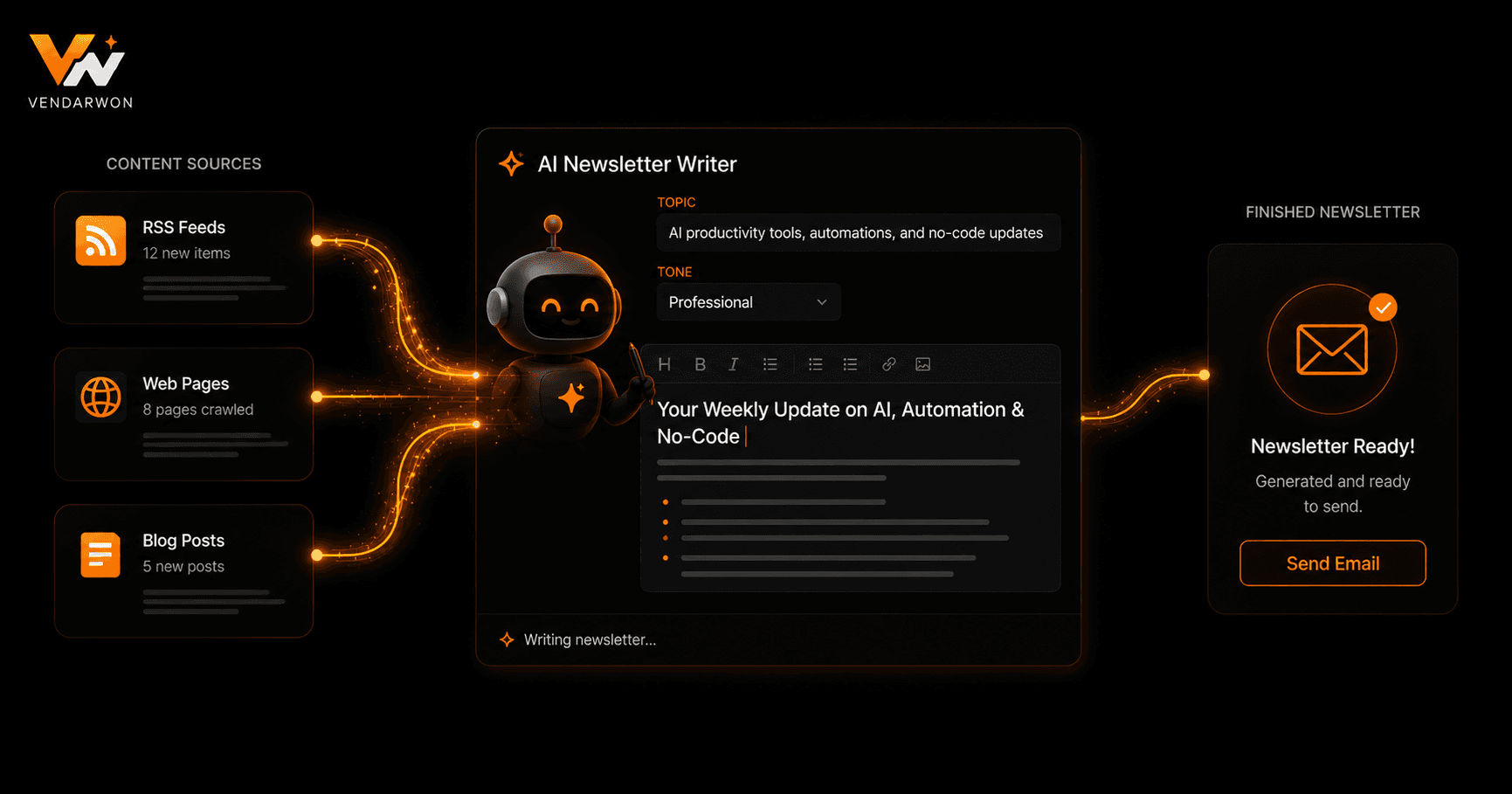
The complete AI newsletter pipeline: sources → collection → AI curation → template population → draft → approval → send
Step 3: Drafting the Newsletter Body
With the curated items selected, your automation populates a newsletter template. The template defines the structure: intro paragraph, curated links section, featured tool of the week, closing note. The AI-generated summaries fill the link section; a separate AI prompt generates the intro paragraph (“Write a 2-paragraph intro for a newsletter about [TOPIC] this week, referencing the theme connecting these items: [ITEM TITLES]”).
Most email platforms (Beehiiv, ConvertKit, Mailchimp, ActiveCampaign) have APIs that allow creating and scheduling email campaigns programmatically. Your automation creates a draft campaign in your email platform with the generated content, ready for review before sending.
Step 4: Review, Approval, and Sending
Unless you fully trust the AI output (which takes time to calibrate), build a review step into the workflow. After creating the draft, send yourself a notification via Slack or email with a link to review the draft in your email platform. Set a deadline: if not reviewed and approved within 24 hours, send anyway (or don't — depending on your preference). For newsletter creators who want hands-off delivery, skip the review step entirely once you've validated the AI quality over several issues.
Personalising for Different Segments
Advanced newsletter automation personalises content by subscriber segment. Different audience segments (beginners vs. advanced, or different industry verticals) receive different curated items, different intro paragraphs, and different featured tools — all generated by the same underlying automation but with segment-specific AI prompts. This level of personalisation at scale is only possible with automation.
FAQ
Which email platforms work best for AI newsletter automation?
Beehiiv and ConvertKit have robust APIs for programmatic draft creation and scheduling. Mailchimp and ActiveCampaign also work well. The key requirement is an API endpoint that lets you create a campaign with HTML content and schedule it — all major platforms support this.
How do I prevent the AI from including low-quality or inaccurate content?
Build a source whitelist — only include RSS feeds and APIs from publications you trust. Add a quality filter step that excludes items below a certain engagement threshold. And always review the first 5–10 automated issues manually before moving to hands-off delivery.
Can I use this for a daily newsletter?
Yes, with a few adjustments: use a 24-hour collection window instead of 7 days, tighten your source list to the most prolific publishers, and consider reducing the number of curated items to 3 instead of 5. Daily newsletters need faster, lighter automation.
Will my subscribers know the newsletter is AI-generated?
Only if you tell them — and many creators do, framing it as “AI-assisted curation with human editorial review.” Transparency builds trust. The editorial perspective you add during review is what differentiates your newsletter from a generic content feed.