Monthly client reports are one of the biggest time sinks in agency work. A thorough report covering SEO, paid ads, social media, and email performance across 10 clients can take 20–30 hours to compile manually each month. AI-powered reporting automation can reduce this to under 2 hours — pulling data automatically, generating AI insights, and delivering a professional report to each client without a team member touching a spreadsheet.
Why Agencies Are Still Building Reports Manually
Most agencies haven't automated reporting because it seems technically complex. Different clients use different tools; data lives in Google Analytics, Google Ads, Meta Business Manager, Semrush, Mailchimp, and a dozen other places. Pulling it all together, per client, each month, feels like a custom engineering project every time.
In 2026, this is no longer true. Most of these platforms have APIs, and automation platforms can query multiple APIs in sequence, aggregate the results, pass them to an AI for narrative generation, and output a formatted document — all triggered by a monthly schedule. The setup takes a few hours; the recurring time savings are enormous.
Step 1: Define the Report Structure
Before building anything, standardise your report template. Define the sections: executive summary, key metrics table, performance highlights, areas for improvement, and recommended actions. Create this as a template in your document generation tool (Google Slides, Google Docs, Notion, or a PDF generator). Automation works best when it's filling in a defined structure — the template is the foundation.
Store client configurations in an Airtable or Notion database: each row represents a client and includes their Google Analytics property ID, Google Ads account ID, Meta Business account ID, email platform API key, and preferred report delivery date. Your automation reads this configuration at the start of each reporting cycle.
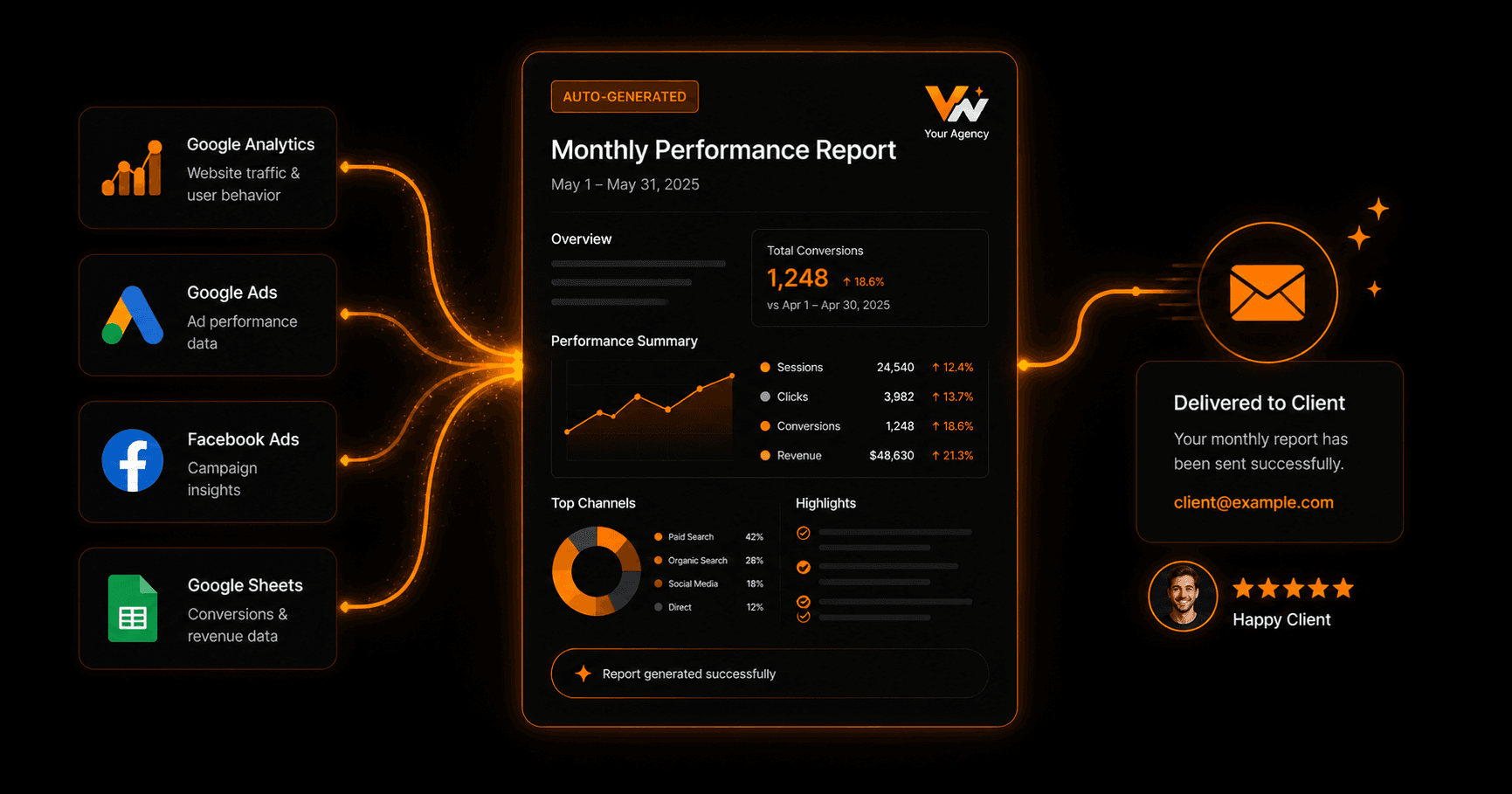
End-to-end reporting automation: data pulled from multiple APIs, AI-generated narrative, report formatted, and emailed to client automatically
Step 2: Automated Data Collection
Your workflow runs on the first day of each month and loops through your client list. For each client, it queries each connected data source for the previous month's metrics. From Google Analytics 4: sessions, new users, bounce rate, conversion rate. From Google Ads: spend, clicks, CTR, CPC, conversions, ROAS. From Meta Ads: spend, reach, CPM, link clicks, conversions. From your SEO tool: keyword rankings, organic traffic, backlinks acquired.
Aggregate all metrics into a structured data object per client. This data object becomes the input for the next step — AI narrative generation. The cleaner and more structured the data, the better the AI output.
Step 3: AI-Generated Narrative and Insights
Pass the structured metrics data to an AI model with a report-writing prompt: “You are a digital marketing analyst. Write a professional monthly performance report based on these metrics. Include an executive summary (3–4 sentences), key wins this month, areas that need attention, and 3 specific recommendations for next month. Use a professional but accessible tone. Here is the data: [DATA].”
The AI returns a narrative that contextualises the numbers. Instead of a table of metrics, the client receives a story: “Organic traffic increased 18% month-over-month, driven primarily by the blog content published in the first week of the month...” This is the kind of insight that takes an analyst 30 minutes to write manually — generated in 15 seconds per client.
Step 4: Report Generation and Delivery
Combine the AI narrative with the raw metrics data into your report template. Tools like Google Slides API, Google Docs API, or a PDF generation service (Documint, PDFMonkey) can populate a template with both text and chart data programmatically. Your automation creates a client-specific document, generates a shareable link or PDF, and emails it to the client on the configured delivery date.
Include a personalised subject line using the client's company name and the month: “[Company] Performance Report — May 2026.” Attach the PDF and include the executive summary in the email body so the client can read the key points without opening the attachment.
Internal Review Step
Before delivery, route each report through an internal review step. The automation creates a draft and sends it to the account manager responsible for that client, with a 48-hour approval window. The account manager reviews the AI narrative, adds any context the AI couldn't know (a campaign that was intentionally paused, a client conversation from last week), and approves it. Once approved, the workflow sends the report to the client. This human quality check ensures the AI-generated content is contextually accurate.
FAQ
Can this work for clients across different industries with different KPIs?
Yes. Store client-specific KPI configurations in your client database. The AI prompt can include the KPIs relevant to each client type — e-commerce clients get ROAS and revenue; lead generation clients get CPL and conversion rate. The template adapts based on the client configuration.
What if a client uses a platform that doesn't have an API?
Some platforms don't expose all data via API. For these, use a manual data entry step: at the start of each reporting cycle, a team member pastes the metrics into a form, which then feeds into the automation like any other data source. Identify which 20% of data sources require manual input and minimise them over time as better integrations become available.
How do clients typically respond to AI-generated reports?
When done well, clients can't tell the difference — and most don't care, as long as the report is accurate, insightful, and delivered on time. The transparency option: mention in your reporting process that you use AI-assisted analysis. Most clients view this as a positive, demonstrating that you use modern tools to deliver better work faster.